 Support
Getting started
What can I do without an account?
You can open Vocial and look around straight away: every Bucket is open to listen to without signing in. To like, comment, follow, record, save or report, you'll be asked to sign in with Apple, Google or your email — it takes a few seconds and there is no password.
How does Vocial choose which languages to show me?
When you first sign up, Vocial automatically detects your primary language based on your location (using IP address approximation). This becomes your first preferred language.
You can add additional languages in two ways:
- Manually select them in Profile > Settings > Language Preferences
- Automatically added when you record a post in a new language—Vocial detects the language of your recording and adds it to your preferences
Your feed will then show posts in all your preferred languages. Vocial uses AI to automatically detect the language of each post, ensuring accurate filtering.
Can I use Vocial on multiple devices?
Yes! Your account syncs across all your devices. Just log in with the same credentials.
Recording and posting
How long can a voice post be?
Up to 5 minutes when you record in the app. Tap the red record button, choose a Bucket (or your Vault), and a short countdown starts the recording. Afterwards you can listen back, add an optional photo and publish.
Need longer? Vocial Studio lets you upload a finished recording of up to an hour from your computer.
What are Buckets?
Buckets are Vocial's categories — News, Singing, Storytime, Late Night, Rant and many more. Every public post lives in one. Open the Buckets tab and tap a Bucket to hear only that topic, or open the list (☰) to browse them all by popularity or A–Z.
What is the Vault?
The Vault is your private space for voice notes, thoughts and reminders to yourself. When you record, choose Personal Vault instead of a Bucket. Vault recordings appear only in yourVault tab — they are not shown on your profile, in any feed or in search, and they can't be liked, commented on or shared.
How do I delete a post?
Tap the three dots (⋯) on your post and choose Delete. It disappears from Vocial straight away. As described in the Privacy Policy, deleted content is kept for up to 90 days, visible only to our moderators, so a report about it can still be reviewed.
How does Vocial use AI?
Vocial uses OpenAI technology in privacy-focused ways to enhance your experience:
- Language Detection (Whisper): Vocial uses OpenAI Whisper to automatically detect the language of your voice posts, ensuring they reach the right audience.
- AI-Generated Titles (GPT-4o-mini): AI creates engaging titles for your posts based on their content, making them more discoverable.
- Transcription (Whisper): AI transcribes your voice posts to make them more accessible and searchable.
Your Privacy Matters: Vocial never uses your content to train AI models, and your data is never sold. All AI processing happens securely through OpenAI's API with strict privacy protections.
Listening and sharing
How do voice comments work?
Open a post's comments and either type, or tap the red record button in the comment field to reply with your voice — up to 60 seconds. You can also reply to someone's comment directly.
Can I listen or record with my screen locked?
Listening, yes — on iPhone and Android a post keeps playing when you lock your phone or switch apps, with controls on the Lock Screen. On iPhone, recording carries on in the background too, and the Dynamic Island and Lock Screen show how long you've been recording with a button to stop.
How do I save a post?
Tap the three dots (⋯) on any post and choose Save. Your saved posts are in Profile >Saved, and only you can see them. Tap Remove from Saved in the same menu to take one out.
Messages and notifications
How do direct messages work?
Open someone's profile and tap Message, or open your inbox from the envelope at the top of your profile. You can send text, photos and voice messages of up to 2 minutes. Voice messages are never transcribed, and you can unsend a message — it is removed for both of you.
How do I manage notifications and emails?
Go to Profile > Settings. Notifications turns push notifications for likes, comments, new followers and messages on or off, and Email Updates controls the occasional email about what's new.
Safety and your account
How do I block a user?
Open their profile and tap the three dots (⋯) at the top right. Choose Block, or Block and report if you'd also like our team to look at the account. Blocked users can't message you or see your profile, and they aren't told. To unblock someone, go to Profile > Settings > Blocked Users and tap Unblock next to their name.
How do I remove a follower?
To remove someone from your followers list, tap Profile > Followers > find the user you want to remove > tap the X button next to their name. This will remove them from your followers without blocking them. They can follow you again if they choose to.
How do I report inappropriate content?
Tap the three dots on any post and select "Report". The moderation team will review it promptly.
Is my data secure?
Yes, Vocial takes security seriously. All data is encrypted and stored securely. Read the Privacy Policy for more details.
How do I delete my account?
Tap Profile > Settings > scroll to the bottom > Delete My Account.
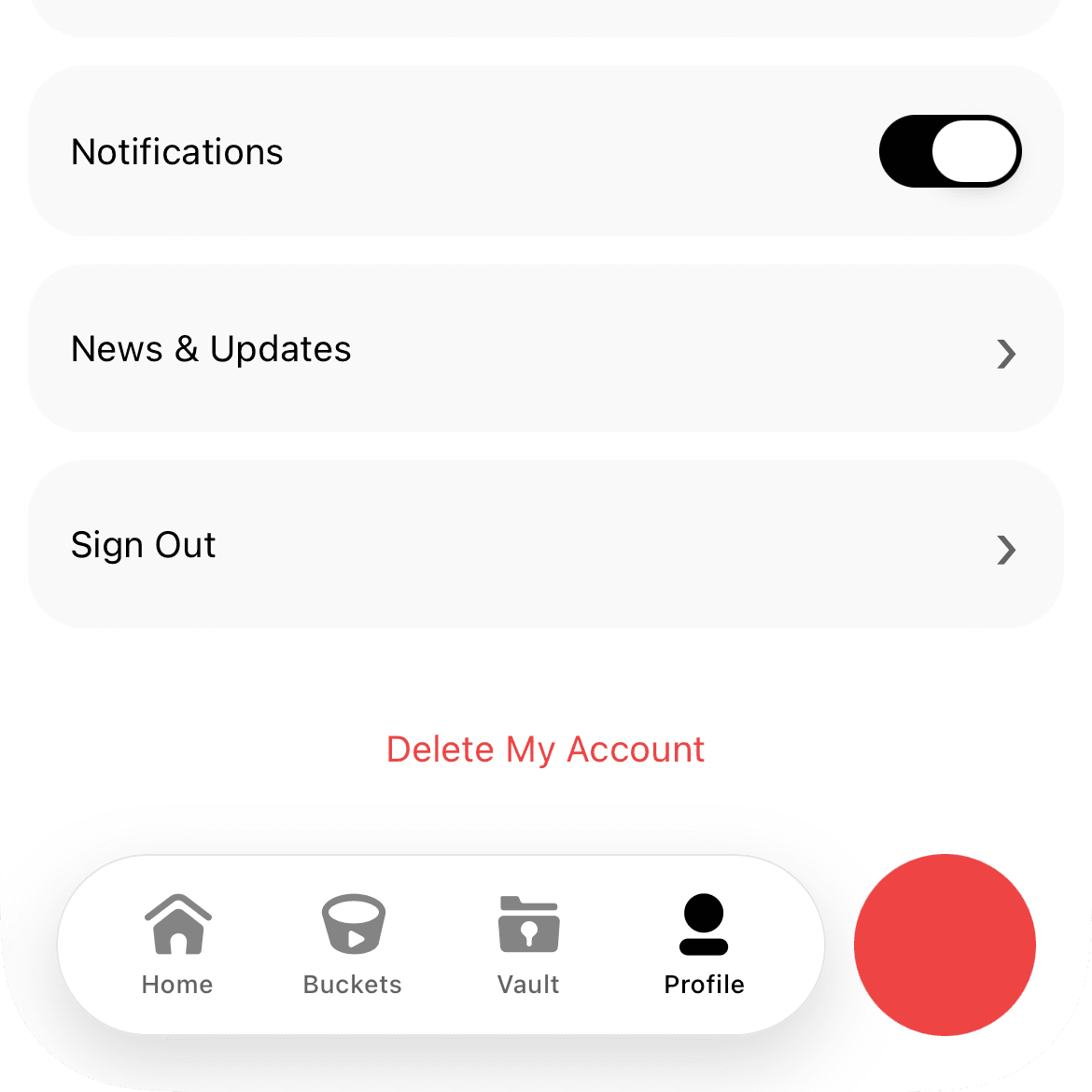
Your account will enter a 2-week pending deletion period. During this time, you can cancel the deletion by simply signing in again. After 2 weeks without signing in, your account and all associated data will be permanently deleted.
Vocial Studio
What is Vocial Studio?
Vocial Studio is Vocial on the web, for creators. Sign in with your Vocial account to publish long-form audio of up to an hour, see how your posts are doing, reply to comments, continue your conversations and catch up on notifications on a bigger screen.
Contact
Email Support
For general inquiries:
support@vocial.app
Privacy Questions
For privacy-related questions:
privacy@vocial.app
Legal Inquiries
For terms and legal matters:
legal@vocial.app
Mail & Phone
Nenad Grujicic
Waterloo, ON, Canada
Phone: +1 (227) 272-0403
Response Time
Support emails typically receive a response within 24-48 hours during business days. Urgent security issues are responded to as quickly as possible.